
Draftsheet AI
Draftsheet AI automatically tracks your real-time work activity to recover lost billable hours without capturing keystrokes or screenshots.
Visit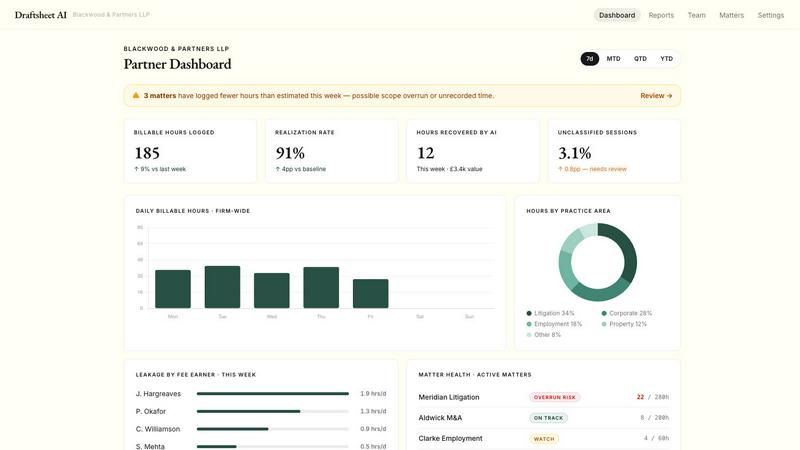
About Draftsheet AI
Draftsheet AI is an innovative time-tracking solution specifically designed for law firms to solve the pervasive problem of underbilling. The average fee earner under-reports 48 billable minutes per day, which at an average hourly rate of £250 translates to approximately £48,000 in lost revenue per fee earner each year. Draftsheet AI addresses this by running silently in the background on each lawyer's machine, monitoring active applications and documents without interrupting their workflow. This allows lawyers to focus entirely on their legal work while the software captures their billable activity automatically. Unlike generic time trackers, Draftsheet AI is built end-to-end for legal billing, with features like AI-powered timesheet generation, client and matter matching, billing code auto-assignment, and direct integration with leading legal billing systems such as Clio and LEAP. The platform is designed for both solo practitioners and larger firms, offering a free pilot period, per-seat annual pricing, and no setup fees. Critically, Draftsheet AI prioritizes security and privacy, capturing only application names, window titles, and browser tab domains while never recording keystrokes, screenshots, file contents, or email bodies. It is fully DPA compliant and uses encrypted activity logs, ensuring that sensitive client information remains confidential. By recovering lost billable time, improving billing accuracy, and increasing overall revenue, Draftsheet AI delivers a compelling return on investment that typically pays for itself within the first week of use.
Features of Draftsheet AI
Silent Passive Activity Capture
Draftsheet AI runs unobtrusively on each fee earner's desktop, monitoring active applications and document titles every few seconds. This eliminates the need for lawyers to manually start and stop timers or fill out timesheets during their workday. The desktop agent captures essential metadata such as the active application name, window and document title, browser tab title and domain, calendar event details, and active or idle timestamps. This passive approach ensures that no billable minute goes unrecorded, drastically reducing time leakage.
AI-Powered Timesheet Generation
At the end of each day, fee earners simply click "Report" and the AI engine automatically groups their captured activity into logical sessions. It intelligently matches these sessions to the correct clients and matters, assigns appropriate billing codes, and writes professional narrative descriptions of the work performed. The system learns from every user edit, whether it is a client reassignment, billing code correction, or narrative tweak, continuously improving its accuracy for each individual fee earner over time.
Comprehensive Revenue Reporting
Practice managers gain real-time visibility into firm-wide billing performance through a dedicated dashboard. This feature displays hours captured, approved, and exported per fee earner, utilization rates by individual and team, a direct comparison of billed versus recorded time to identify leakage at a glance, and detailed breakdowns by client and matter. Reports update in real-time as entries are approved, providing actionable insights before the month-end billing scramble.
Uncompromising Security and Privacy
Draftsheet AI is designed with a strict data policy that prioritizes client confidentiality. The desktop agent never captures keystrokes, typed text, screenshots, screen recordings, file or document contents, email body text, full URLs or query strings, or clipboard contents. All activity logs are encrypted, and data capture is minimal by design. The platform is fully compliant with DPA regulations, making it suitable for law firms handling sensitive client information across all practice areas.
Use Cases of Draftsheet AI
Solo Practitioners Recovering Lost Revenue
Solo lawyers often wear multiple hats, handling client work, administration, and business development simultaneously. Without dedicated support staff, time tracking frequently falls by the wayside, leading to significant underbilling. Draftsheet AI automatically captures every minute spent on client matters, from drafting documents in Word to reviewing emails in Outlook and conducting research in Chrome. The solo practitioner can review and approve entries in under ten minutes at day's end, ensuring every billable minute is captured and invoiced.
Mid-Sized Firms Improving Utilization Rates
Mid-sized law firms face the challenge of monitoring productivity across multiple fee earners and practice groups. Draftsheet AI provides practice managers with a real-time utilization dashboard that shows exactly how each lawyer's time is being spent. By identifying underutilized team members or those consistently underreporting time, firm leadership can implement targeted coaching or redistribute workloads. The revenue reporting feature also helps forecast monthly billings and identify trends in client work, enabling more strategic resource allocation.
Litigation Teams Managing High-Volume Document Work
Litigation involves extensive document review, drafting, and correspondence that can be difficult to track manually. Draftsheet AI captures activity across document management systems like iManage, word processors, and email clients, automatically grouping related work into coherent sessions. The AI assigns billing codes and writes narratives that accurately reflect the specific document or matter worked on, such as "Reviewed and revised settlement agreement for Mercer v. Halcyon." This eliminates the need for lawyers to reconstruct their day from memory.
Corporate Lawyers Ensuring Accurate Matter Billing
Corporate lawyers often juggle multiple clients and matters simultaneously, switching between tasks frequently throughout the day. Draftsheet AI's passive capture ensures that even short bursts of activity, such as a 14-minute research session on HMRC trust guidance or a 19-minute email review for a property transaction, are recorded accurately. The system's ability to learn from user corrections means that over time, it becomes more precise in matching activities to the correct client and matter, reducing the administrative burden on fee earners and improving billing accuracy.
Frequently Asked Questions
How does Draftsheet AI ensure client confidentiality and data security?
Draftsheet AI is built with privacy as a core principle. The desktop agent never captures keystrokes, screenshots, file contents, email bodies, full URLs, or clipboard data. It only records the active application name, window title, browser tab domain, and timestamps. All captured data is encrypted, and the platform is fully compliant with DPA regulations. This means that while the system knows you were working on a document called "SettlementDraft_v3.docx" in Word, it has no access to the actual content of that document.
How much time does a fee earner need to spend on timesheets each day?
Fee earners typically spend just 10 minutes at the end of each day reviewing and approving their automatically generated timesheet. The AI groups captured activity into sessions, matches them to clients and matters, assigns billing codes, and writes narratives. The user simply reviews the entries, makes any necessary corrections or reassignments, and approves them. This is a dramatic reduction compared to manual time tracking, which can take 30 minutes or more per day and often relies on faulty memory.
What billing systems does Draftsheet AI integrate with?
Draftsheet AI offers direct integration with leading legal billing systems including Clio and LEAP. Approved timesheet entries can be pushed directly into these systems with a single click, eliminating the need for manual data entry or CSV file imports. The platform also supports CSV and PDF export for firms using other billing systems. The integrations are designed to be seamless, ensuring that time captured by Draftsheet AI flows directly into the firm's existing billing workflow.
Can Draftsheet AI be used on a trial basis before committing?
Yes, Draftsheet AI offers a free pilot period for prospective customers. This allows law firms to test the software with their own fee earners and actual workflow before making any financial commitment. The setup process is described as easy and fast, and there are no setup fees. Customers can cancel at any time during the pilot period. After the pilot, pricing is based on a per-seat annual contract with no hidden fees, and the product is designed to pay for itself within the first week of use through recovered billable time.
Similar to Draftsheet AI

Arceus Legal
Arceus Legal delivers flat-fee AI contract review and negotiation with guaranteed fast turnaround for growing companies.
Popform
Popform combines AI-powered contract management with unlimited e-signatures for a flat $11 monthly fee.
Commentari
Commentari empowers you to transform community insights into impactful legal comments with AI-driven clarity and efficiency.