
ProcessSpy
ProcessSpy is an advanced process monitor for macOS that provides detailed insights and real-time monitoring for optimal system performance.
Visit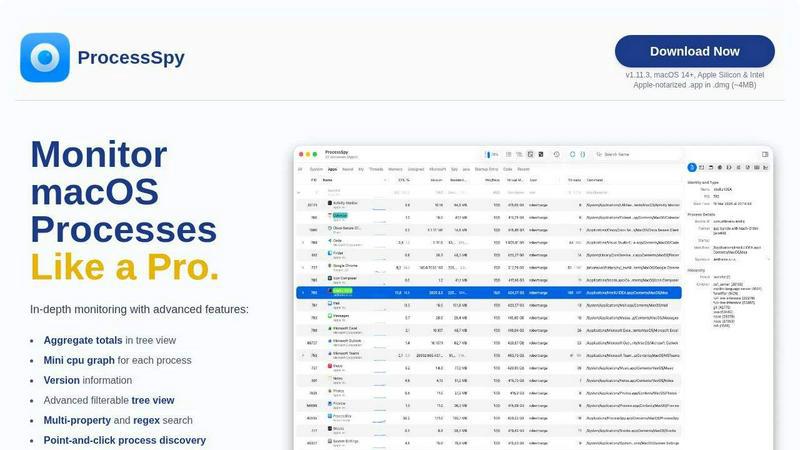
About ProcessSpy
ProcessSpy is a powerful process monitoring tool designed specifically for macOS, providing users with deep insights into their system's operations. It serves as a native alternative to the widely known Sysinternals Process Explorer, enabling users to visualize process trees, inspect open files, and view environment variables. Unlike the built-in Activity Monitor, ProcessSpy reveals critical details often hidden from view, such as full command-line information and version details, making it an essential tool for developers and advanced users. With a focus on performance and system integration, ProcessSpy utilizes native APIs to deliver a fast and responsive user experience. Its advanced filtering and search capabilities allow users to efficiently track and manage processes, ensuring optimal system performance. Whether you are a developer juggling multiple applications or a power user looking to optimize your macOS experience, ProcessSpy provides the comprehensive tools you need to monitor and manage processes effectively.
Features of ProcessSpy
Advanced Tree View
ProcessSpy features a detailed tree view that allows users to explore process hierarchies effortlessly. This view includes real-time filtering and search capabilities, enabling users to quickly find specific processes. It also displays aggregate totals for CPU, Memory, and Threads, giving users a comprehensive overview of system performance at a glance.
Javascript Filters
One of ProcessSpy's standout features is its ability to define filters using Javascript. This functionality allows users to create complex filtering conditions based on multiple criteria, significantly enhancing the search capabilities. Users can tailor their process discovery experience, making it easier to locate specific processes or groups of processes.
Process History Recording
With the paid version of ProcessSpy, users can record historical values for CPU, Memory, and Threads. This feature includes aggregate values and shows the application's active status over time. Users can export this data to CSV, providing a valuable resource for performance analysis and troubleshooting.
Multi-property and Regex Search
ProcessSpy supports advanced search functionalities, including multi-property and regular expression searches. Users can quickly find processes by searching for specific terms across various properties, such as command-line arguments and process names. This flexibility allows for efficient process management and monitoring.
Use Cases of ProcessSpy
Monitoring Development Environments
Developers often work with multiple applications that utilize different environments or configurations. ProcessSpy enables them to monitor these processes effectively, providing detailed command-line information and version details to distinguish between similar processes.
Troubleshooting Performance Issues
When performance issues arise, ProcessSpy can help identify resource-intensive processes. Users can analyze CPU and memory usage in real time, allowing for quick troubleshooting and optimization of system resources to enhance overall performance.
Managing Background Processes
ProcessSpy is ideal for users who need to manage background processes effectively. By providing insights into open files and network connections, users can make informed decisions about which processes to terminate or keep running, ensuring their system remains responsive.
Historical Data Analysis
For users requiring insight into process behavior over time, ProcessSpy's history recording feature offers valuable data. By analyzing historical CPU and memory usage, users can identify trends and anomalies, enabling more informed system management and optimization strategies.
Frequently Asked Questions
Is ProcessSpy safe to install on my Mac?
Yes. ProcessSpy is Apple-notarized and distributed as a signed .app inside a .dmg. It has been verified for safety on both Intel and Apple Silicon Macs, ensuring a secure installation.
Does ProcessSpy support older versions of macOS?
ProcessSpy is designed for macOS 14 and newer. Users running older versions of macOS will need to upgrade their systems to utilize ProcessSpy's features.
What is the licensing model for ProcessSpy?
The licensing model allows for one user on unlimited devices. It includes lifetime updates and access to new features, making it a cost-effective tool for long-term use.
How does ProcessSpy compare to Activity Monitor?
ProcessSpy outperforms Activity Monitor by providing detailed command-line and path information, the ability to distinguish between same-named processes, and advanced filtering options. In contrast, Activity Monitor lacks these comprehensive features, making ProcessSpy a superior choice for advanced users.
Similar to ProcessSpy

Egmatic
Egmatic is a no-code editor for 2D games that takes a project from first scene to published build, with no backend work.

StackLedge
The human-curated directory of active SaaS, practical AI tools, and custom n8n workflows. Discover software that works, backed by real upvotes.

WidgIq
Provide an AI-powered customer support widget for your website

Product Launch Checklist
A free launch checklist for SaaS, apps, AI tools and more. Every step says why it matters and when you can skip it.

Forms Plugin
The #1 Native Form Builder Plugin for Framer - No Code, No Embeds, No External Platforms.

Chatit Me - Free Random Chat Alternative
Chat with random strangers online for free on ChatIt.me. Enjoy safe, anonymous, and instant 1-on-1 conversations with people worldwide

AkraLabs
Where modern software products get discovered, launched, and distributed. Explore verified AI tools, SaaS startups, and developer software.

VidhyaGen
Fast, free, and privacy-focused online tool to convert image formats instantly without losing quality. Built for web users and creators.