
QuickTextTools
QuickTextTools provides over 76 free, browser-based utilities to instantly process text without sign-ups, enhancing productivity for writers and.
Visit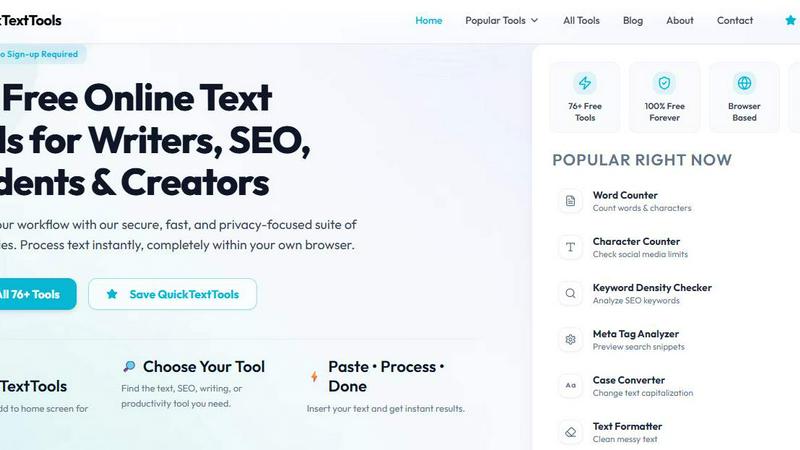
About QuickTextTools
QuickTextTools is a comprehensive, free, and user-friendly online platform that provides over 76 browser-based utilities designed to enhance productivity for writers, marketers, developers, students, SEO professionals, and content creators. This all-in-one toolkit offers a diverse array of tools, including text formatting utilities, SEO analysis tools, writing assistants, keyword management features, and developer resources, all aimed at simplifying daily workflows and saving valuable time. The platform is built around a core philosophy of providing fast, easy-to-use, and privacy-focused tools that operate entirely within your web browser. This eliminates the need for complicated setups, software downloads, or account registrations. Users can simply visit the site, select a tool, paste their text, and receive instant results. Whether you need to clean up a messy keyword list, analyze SEO meta tags for a website, convert text case formatting, count words and characters, or generate QR codes, QuickTextTools delivers practical, secure, and hassle-free solutions. The platform is completely free to use with no sign-up required, making it an accessible resource for anyone looking to work smarter and more efficiently. All data processing occurs locally on the user's device, ensuring complete privacy and security. The site is organized into clear categories like Writing Tools, SEO Tools, Text Cleaning Tools, Developer Tools, and Productivity Tools, making it simple to find the exact utility needed for any task.
Features of QuickTextTools
Comprehensive Tool Suite
QuickTextTools offers over 76 distinct browser-based tools, covering a wide range of needs for content creation, SEO, development, and productivity. This extensive collection includes everything from essential utilities like Word Counters and Case Converters to specialized tools like Keyword Density Checkers, Meta Tag Analyzers, JSON Formatters, and QR Code Generators. The breadth of the toolkit means users can accomplish multiple tasks without switching between different websites or applications, creating a centralized hub for text processing and analysis.
100% Browser-Based and Privacy Focused
All tools operate directly within the user's web browser, meaning no files are uploaded to any external server. This browser-based architecture ensures that all text processing, analysis, and formatting happens locally on the user's device. This design guarantees complete data privacy and security, as sensitive content, such as proprietary marketing copy or personal documents, never leaves the computer. This approach also eliminates the need for software downloads, installations, or account sign-ups, providing an instant and secure user experience.
Intuitive User Interface and Workflow
The platform is designed with a straightforward three-step workflow: "Choose Your Tool," "Paste Your Text," and "Process and Get Done." This simple, linear process minimizes complexity and allows users to achieve their goals quickly. The website features a clean, uncluttered layout with clear navigation, including a homepage with popular tools, a complete list of all tools, and categorized browsing options. This user-centric design ensures that even first-time visitors can immediately find and use the tools they need without any learning curve.
Regularly Updated Tool Library
QuickTextTools is a growing platform that consistently adds new utilities to meet evolving user needs. The site features a "Recently Added Tools" section that highlights the newest additions to the suite, such as QR Code Generators, Random Password Generators, Pomodoro Timers, and social media caption generators. This commitment to ongoing development ensures the toolkit remains relevant and valuable, continuously expanding its capabilities to address emerging trends in content creation, SEO, and digital productivity.
Use Cases of QuickTextTools
SEO Content Optimization
SEO professionals and content marketers can leverage tools like the Keyword Density Checker to analyze the frequency of target keywords within their content, ensuring optimal usage without keyword stuffing. The Meta Tag Analyzer allows users to preview how their web pages will appear in search engine results, helping to craft compelling titles and descriptions. The SEO Title Generator and Keyword Builder further assist in creating optimized content strategies, while the Text Cleaner removes unwanted formatting from copied content, ensuring clean, search-engine-friendly text.
Academic and Professional Writing
Students, researchers, and professional writers can use the Word Counter, Character Counter, and Sentence Counter to ensure their documents meet specific length requirements for essays, reports, or submissions. The Reading Time Calculator helps estimate how long it will take an audience to read a piece of content, which is valuable for presentations or time-sensitive communications. The Text Compare Tool allows for easy comparison of two versions of a document to highlight changes, while the Case Converter can quickly standardize text formatting across a document.
Web Development and Data Handling
Developers can utilize the JSON Formatter to beautify and validate JSON data structures, making them easier to read and debug. The Base64 Encoder and URL Encoder are essential for handling data encoding tasks in web applications. The QR Code Generator enables quick creation of scannable codes for URLs or text, and the Random Password Generator helps create secure credentials for testing or user accounts. These tools streamline common development tasks without requiring command-line interfaces or external software.
Social Media and Content Creation
Content creators and social media managers can use the Character Counter to ensure posts fit within platform-specific character limits for platforms like Twitter or Instagram. The YouTube Title Generator and Instagram Caption Generator provide creative inspiration for engaging social media content. The Hashtag Generator helps identify relevant and trending hashtags to increase post visibility. The Text Cleaner and Remove Extra Spaces tools are ideal for cleaning up text copied from various sources, ensuring polished and professional-looking social media updates.
Frequently Asked Questions
Is QuickTextTools really free to use?
Yes, QuickTextTools is completely free to use with no hidden costs or premium tiers. There is no requirement to sign up, create an account, or provide any personal information. All 76+ tools are accessible to everyone at no charge, and the platform is committed to remaining 100% free forever.
How does QuickTextTools ensure my data privacy?
QuickTextTools processes all data entirely within your own web browser. No text, files, or information you input into any tool is ever sent to or stored on a remote server. This client-side processing ensures that your sensitive content, including proprietary business documents or personal information, remains completely private and secure on your own device.
Do I need to download or install any software?
No, you do not need to download or install any software. QuickTextTools is a fully browser-based platform. All you need is a modern web browser and an internet connection to access the website. Simply visit the site, choose a tool, paste your text, and get instant results without any complicated setup or installations.
Are new tools added to the platform regularly?
Yes, QuickTextTools is an actively maintained and growing platform. The development team regularly adds new tools based on user feedback and emerging needs. You can find the latest additions in the "Recently Added Tools" section on the homepage, which currently includes tools like QR Code Generators, Password Generators, and social media caption generators.
Explore more in this category:
Similar to QuickTextTools
Novastart
Apps and files on an infinite canvas where people and AI agents work together.

invoala
Invoala is a free invoice, quote and estimate generator: you fill in a form and download a professional A4 PDF, with no sign-up and no credit card nee
AI Email Filter
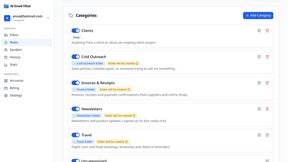
AI Email Filter sorts incoming mail into folders using plain-language prompts you write. Works with any IMAP mailbox; bring your own LLM if you want.

Product Launch Checklist
A free launch checklist for SaaS, apps, AI tools and more. Every step says why it matters and when you can skip it.

Kody Tools
Free collection of online developer utilities, code formatters, and digital converters designed to streamline your daily workflow.

Forms Plugin
The #1 Native Form Builder Plugin for Framer - No Code, No Embeds, No External Platforms.

