RoomCreator
RoomCreator instantly transforms any photo into stunning AI interior designs with no skills required.
Visit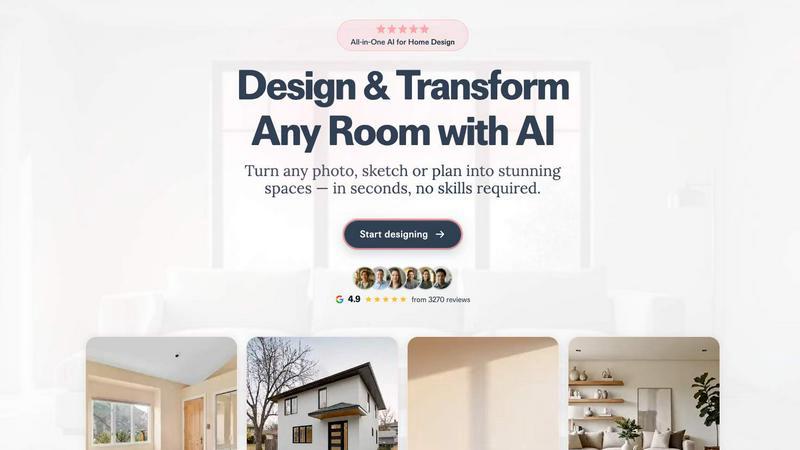
About RoomCreator
RoomCreator is an all-in-one AI-powered home design platform that empowers homeowners, DIY enthusiasts, and real estate professionals to visualize and transform any space with unprecedented speed and ease. At its core, RoomCreator democratizes interior and exterior design by allowing anyone to upload a simple photo—whether it's a messy room, a pixelated image, or even a hand-drawn sketch—and receive hyper-realistic redesigns in as little as 10 seconds. The platform eliminates the need for expensive design software, professional skills, or lengthy consultation cycles, making advanced visualization accessible to all.
The tool is built for a diverse audience, including homeowners planning renovations, real estate agents looking to enhance property listings, and individual investors evaluating potential projects. Its main value proposition lies in its ability to turn abstract ideas into concrete, photorealistic visuals. Users can experiment with smart layout changes, new color palettes, furniture arrangements, and complete style makeovers across various rooms like kitchens, bedrooms, and living rooms, as well as exterior facades. This enables confident, informed decision-making before committing time or money to physical changes. With a free trial offering and a suite of specialized tools, RoomCreator is the fastest and simplest way to bridge the gap between imagination and reality in home design.
Features of RoomCreator
Instant Interior Redesign
This flagship feature allows users to upload a photo of any interior space and instantly generate multiple professionally designed alternatives. The AI analyzes the room's dimensions and features to apply realistic layouts, furniture, color schemes, and lighting effects tailored to dozens of pre-set styles like Modern, Scandinavian, or Bohemian. It provides a comprehensive before-and-after comparison, enabling users to visualize the full potential of their space with lifelike accuracy before making any purchases or starting renovations.
Exterior Design Visualizer
Specifically crafted for curb appeal, this tool lets homeowners and real estate agents test exterior transformations using a single photo. Users can visualize changes to siding materials, paint colors, roofing, landscaping, and architectural details. This is invaluable for planning repainting projects, renovations, or for creating compelling listing images that showcase a property's potential, all without the cost and hassle of physical staging or manual rendering.
Precision Brush Editor
Offering granular control, the Brush Editor (or Inpaint Tool) enables users to make targeted edits without regenerating an entire scene. By simply brushing over a specific area—such as a piece of furniture, decor, or wall section—users can remove or replace only that element. This feature provides the flexibility to fine-tune designs, experiment with different decor items in a specific spot, or correct minor details, saving time and offering a more customized design process.
Empty Room Generator & Sketch to Render
This dual-functionality tool addresses two key design starting points. First, it can instantly declutter any room photo, removing all furniture and objects while preserving the architectural shell (walls, floors, windows), providing a clean canvas. Second, it can transform a basic hand-drawn sketch or floor plan into a fully realized, photorealistic interior image. This is perfect for visualizing early concepts and planning layouts from the ground up, turning rough ideas into tangible designs in seconds.
Use Cases of RoomCreator
Home Renovation Planning
Homeowners can use RoomCreator to plan and visualize renovations with confidence. Before buying paint, furniture, or hiring contractors, they can upload photos of their existing kitchen, bathroom, or living room to test different styles, layouts, and color schemes. This reduces the risk of costly mistakes, helps in making cohesive design decisions, and facilitates agreement among household members by providing a clear visual reference of the proposed outcome.
Real Estate Listing Enhancement
Real estate agents can significantly enhance property listings by transforming empty, cluttered, or outdated rooms into beautifully staged and stylish interiors. By generating attractive, realistic images, they can help potential buyers visualize themselves in the space, thereby increasing the property's appeal, perceived value, and potentially accelerating the sale process without the expense of physical staging or professional photography.
Investment Property Analysis
Individual real estate investors and house flippers can utilize RoomCreator to evaluate the renovation potential of a property. By visualizing various upgrade options—from cosmetic updates like paint and flooring to more significant layout changes—they can assess which improvements will add the most value. These visuals can also be used in presentations to secure funding or to market the future potential of a property to buyers or renters.
DIY Decorating and Style Experimentation
DIY lovers and individuals redecorating can experiment freely with their personal style. The tool allows for endless experimentation with trends like Japandi, Coastal, or Industrial design without any commitment. Users can see how a new sofa would fit, try bold wall colors, or explore different lighting setups, making the decorating process fun, informed, and aligned with their personal aesthetic vision.
Frequently Asked Questions
How accurate and realistic are the RoomCreator designs?
RoomCreator generates hyper-realistic previews by using advanced AI models trained on vast datasets of interior and exterior designs. The results incorporate natural lighting, shadows, textures, and proportional furniture to create images that closely resemble a professional photograph. While highly accurate for visualization and inspiration, it is always recommended to take precise measurements for furniture and consult sample swatches for exact color matching in your physical space.
What kind of photos work best with RoomCreator?
The platform is designed to be flexible. Clear, well-lit photos taken from a corner of the room (showing two walls) yield the best results. However, RoomCreator can also work with messier rooms, lower-resolution images, and even rough hand-drawn sketches. The key is to ensure the main boundaries of the space (walls, floor, ceiling) are visible for the AI to understand the room's structure.
Is there a free trial available?
Yes, RoomCreator offers a free trial that provides users with credits to test the core features without requiring a credit card. This allows new users to upload photos, generate several redesigns, and explore the platform's capabilities to see if it meets their needs before choosing a paid plan.
Can I use RoomCreator for commercial purposes, like my real estate business?
Absolutely. RoomCreator has specific use cases and tools tailored for professionals like real estate agents and investors. The visuals generated can be used to enhance property listings, marketing materials, and client presentations. Users should review the specific terms of service for their subscription plan regarding the commercial usage rights of the generated images.
Similar to RoomCreator

Egmatic
Egmatic is a no-code editor for 2D games that takes a project from first scene to published build, with no backend work.

DebutPin
Indie product playground — ship products, collect pins for the ones you genuinely like.

Built2WinWeb AI SEO
Custom PHP websites, AI Indexing Pack ($599 one‑time), and WebAgentScan SaaS ($9/mo). MCP, A2A, llms.txt, full ownership.

PDFWix
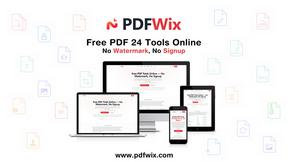
PDFWix solves the challenge of managing PDF documents by providing free, secure, and easy-to-use tools for editing, converting, compressing and more..

Wisegrid
Wisegrid helps project-driven teams manage projects, workflows, resources, and reporting in a familiar spreadsheet-style workspace.