
Caesura
Caesura is a macOS menu-bar app that reminds you to drink water, stretch, rest your eyes, and breathe at science-backed intervals.
VisitPublished on:
June 26, 2026
Pricing:
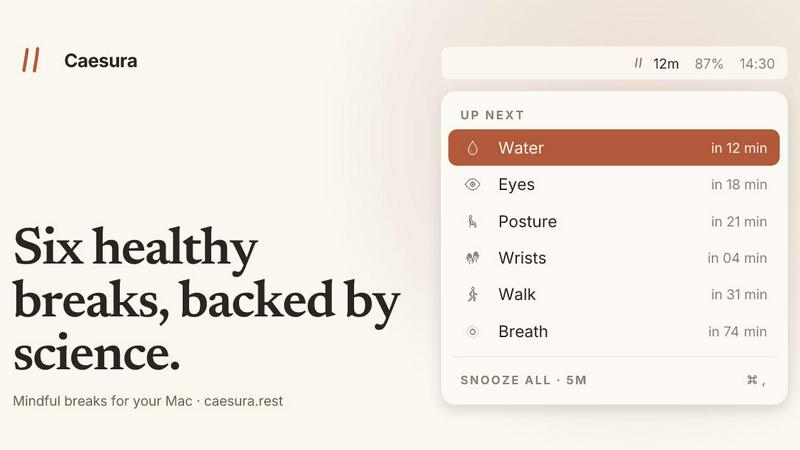
About Caesura
Caesura is a calm, focused macOS menu-bar break manager designed specifically for people who spend long hours at a desk. Unlike intrusive productivity tools or complex wellness apps, Caesura operates quietly in the background, delivering gentle, science-backed reminders for six essential health habits: drinking water, walking, stretching your wrists, resting your eyes, checking your posture, and breathing. Each reminder runs on its own independent schedule, with intervals derived from peer-reviewed research rather than arbitrary round numbers. The application intelligently coalesces reminders that fall close together into a single, unified break, ensuring you are never interrupted twice in a row. Caesura respects your workflow by automatically pausing during video calls, screen sharing, fullscreen applications, Do Not Disturb mode, calendar events, and games, then resuming exactly where it left off. There are no accounts to create, no telemetry, no clutter, and no subscription fees. It is a one-time purchase for macOS 14 and later, with a free 14-day trial available. The product targets remote workers, developers, designers, writers, and anyone whose daily routine involves prolonged sitting and screen time, helping them build sustainable health habits without breaking concentration.
Features of Caesura
Science-Backed Break Intervals
Each of the six break types operates on an interval determined by relevant scientific research, not arbitrary numbers. Water reminders appear every 45 minutes based on hydration studies, walking breaks trigger every 60 minutes per movement research, wrist stretches every 30 minutes, eye rests every 20 minutes following the 20-20-20 rule, posture shifts every 30 minutes, and breathing exercises every 90 minutes. Users can independently enable or disable any break and adjust intervals to suit personal preferences.
Intelligent Coalescing and Automatic Pausing
When two or more reminders become due within a minute of each other, Caesura coalesces them into a single, combined break prompt, preventing back-to-back interruptions. The application automatically pauses all timers when it detects video calls, screen sharing, fullscreen apps, Do Not Disturb mode, calendar events, games, or FaceTime in the foreground. Timers freeze instantly and resume seamlessly once the activity ends, preserving the exact remaining time before each break.
Customizable Break Presentation Styles
Every break type can be assigned one of three distinct presentation styles. The overlay style takes over the entire screen until dismissed, ideal for breaks like water that are easy to ignore. The banner style slides in from the menu bar and auto-dismisses after 30 seconds, perfect for gentle nudges. The notification style delivers a standard macOS notification for the lightest possible touch. Users can mix and match styles per break type.
Guided Break Experiences
Specific breaks include interactive guides that enhance the experience. The breathing break features a soft expanding orb with a progress bar pacing four-second inhales and six-second exhales over three cycles. The eye break displays a small pill that follows the cursor with a 20-second countdown ring. The wrist break presents four illustrated stretches on the overlay, each lasting ten seconds. These guided elements make the breaks actionable without requiring additional effort.
Use Cases of Caesura
Remote Workers and Freelancers
Professionals working from home often lose track of time during deep work sessions, forgetting to hydrate, move, or rest their eyes. Caesura runs discreetly in the menu bar, providing timely reminders that respect their focus. When a video call begins, all timers pause automatically, so no break interrupts a client meeting. After the call, the same timer countdown resumes, ensuring consistency.
Software Developers and Engineers
Developers frequently experience prolonged periods of intense concentration, leading to eye strain, wrist discomfort, and poor posture. Caesura’s 20-minute eye break and 30-minute wrist stretch reminders help prevent repetitive strain injuries and digital eye fatigue. The coalescing feature ensures that when both reminders align, they appear as one combined break, minimizing disruption to coding flow.
Writers and Content Creators
Writers who spend hours at a keyboard benefit from Caesura’s posture shift reminders every 30 minutes, encouraging them to change position and prevent back pain. The walking break every 60 minutes prompts a short walk around the room or office, which research shows improves cognitive function and creativity. The breathing break every 90 minutes helps reset mental focus during long writing sessions.
Health-Conscious Desk Workers
Individuals who want to build sustainable wellness habits without complex apps or subscriptions use Caesura as a passive health companion. The science-backed intervals remove the guesswork from break timing, while the ability to disable specific breaks allows customization based on personal needs. The one-time purchase model and absence of accounts make it a privacy-respecting, permanent addition to their workflow.
Frequently Asked Questions
How does Caesura detect when I am on a call or busy?
Caesura monitors system-level indicators including camera activation, screen sharing status, fullscreen application usage, Do Not Disturb mode, calendar events, and foreground FaceTime sessions. When any of these conditions are active, all break timers freeze automatically and resume once the activity ends. The application does not record or transmit any data about your activities.
Can I customize the intervals for each break type?
Yes, every break type has a default interval derived from scientific research, but you can adjust each interval to any value you prefer. You can also completely disable any break type if it does not align with your needs. All customizations are saved locally and require no account or cloud synchronization.
What happens if two reminders are due at the same time?
Caesura intelligently coalesces reminders that fall within one minute of each other into a single break prompt. For example, if your water and eye breaks are due simultaneously, you will see one combined notification rather than two separate interruptions. This prevents the app from disrupting your workflow multiple times in quick succession.
Is Caesura a subscription or a one-time purchase?
Caesura is a one-time purchase for $15. There are no subscriptions, no recurring fees, and no accounts required. You can try the application free for 14 days before deciding to buy. The purchase includes all current features and future updates for macOS 14 and later.
Pricing of Caesura
Caesura is available as a one-time purchase for $15. No subscription fees, no accounts, and no credit card required for the free trial. Users can try the application free for 14 days with full access to all features. The purchase is valid for macOS 14 and later versions, and includes all future updates. There is no telemetry, no data collection, and no ongoing costs.
Similar to Caesura
Kody Tools
Free collection of online developer utilities, code formatters, and digital converters designed to streamline your daily workflow.

Forms Plugin
The #1 Native Form Builder Plugin for Framer - No Code, No Embeds, No External Platforms.




PDFKing
Free all-in-one online PDF toolkit to convert, compress, merge, split, edit, organize and protect PDF files quickly and securely.